
OnlyFans has no searchable directory of free pages, so subscribers must rely on outside sources to find them. That single structural fact explains most of the frustration people feel when they open the app expecting a browsable catalog. This guide covers why discovery works the way it does, which external channels surface $0 pages, how to filter a long list quickly, and how to stay safe. BestOnlyFans, a ranking-methodology project, appears here as one example of how third-party data gets organized.
The short answer to the title’s promise: you find free pages through external channels, not through the platform itself. Social profiles, niche forums, ranking directories, and creator cross-links do the work an internal search engine would normally do. BestOnlyFans refreshes its rankings every month.

Why Discovery Feels Hard on OnlyFans
There is no grid of thumbnails, no category browser, no search bar that returns creators by price or topic. A subscriber who wants a free page must already know the creator’s handle or arrive through a link posted somewhere else.
The platform positions itself as a hosting and billing layer, not a marketplace with storefronts competing for attention. Ranking directories, review blogs, and aggregator lists organize creators by niche, price, and activity level because the platform itself refuses to.

A browsable feed would have to rank millions of accounts, and the company has never built one.
External Channels Subscribers Use
Five channels do most of the work when someone is looking for free pages.
- Social profiles: creators routinely post their page link in bios on other platforms, which makes a profile check the fastest single verification step.
- Niche forums: topic-specific communities maintain thread lists where members share and review free pages, though quality varies widely.
- Ranking directories: structured sites that sort creators by price, activity, and category, which is the closest thing to a search engine available.
- Creator cross-links: established creators sometimes link to peers, and those recommendations tend to be more selective than open directories.
- Community threads: broader discussion boards where free-page recommendations surface in comment sections rather than dedicated lists.
A forum thread might mention twenty pages across forty comments; a directory presents the same information in columns that can be scanned in seconds.

More pages meant more noise, and the directories that tracked price and activity data became the practical starting point for most searches.
How Ranking Sites Handle Free Pages
A ranking site that handles free pages well does three things: it records the price, it tracks activity, and it timestamps every update.
| Data point | What it shows | Why it matters |
|---|---|---|
| Listed price | Whether the page is $0 or falls in the $4.99-$49.99 paid range | Prevents wasted clicks on paid pages when you want free access |
| Activity level | How recently the creator posted or sent messages | An inactive free page delivers nothing even at $0 |
| Last-updated date | When the listing itself was checked | Old timestamps usually mean the page changed or went inactive |
| Content category | The niche the page covers | Speeds up filtering before you open anything |
BestOnlyFans is one example of a directory that publishes its ranking methodology alongside the listings, letting a reader judge how the order was produced rather than trusting it blind. That transparency matters more for free pages than paid ones, because a $0 listing that turns out to be inactive costs time rather than money.

The platform takes a 20% fee on everything, and the creator keeps 80%. A page listed at $0 is not earning from subscriptions at all, which means its income depends entirely on PPV messages and tips.
Tip: when a directory shows no price column or no last-updated date, treat the listing as unverified. Two missing fields is a reliable signal that nobody has checked the page recently.
Filtering by Price and Access Type
Working through the steps in order keeps you from opening pages that were never going to match what you wanted.
- Check the price column first and confirm whether the listing shows $0 or a paid figure between $4.99 and $49.99.
- Confirm the access type: a free page earns through PPV and tips, while a paid page charges a base subscription.
- Note the last-updated date and skip anything that has not been checked in the past few months.
- Read the bio summary in the listing before clicking through, since a vague description usually reflects a vague page.
- Skip any listing with missing details such as no category, no activity note, or a broken link.
One pricing detail trips people up regularly. Promotional first months can sit below the $4.99 minimum, for example a $3 first month, but the base price of a paid page never goes below $4.99. If a listing advertises a permanent price under that floor, the number is either a promotion or an error.
Free pages, by contrast, set the subscription price to $0 and earn through PPV messages and tips instead. Those figures do not appear on the subscription line, so a $0 listing can still involve spending later.
For readers comparing how free access is handled across platforms, one reference point is onlyfans free subscribe without card, which discusses the mechanics of subscribing without a card on file. The comparison clarifies which parts of the signup flow are platform-wide and which are specific to one service.
Verifying a Free Page Before Following
A listing tells you what someone recorded. Five checks cover most of the ground.
- Post dates: the newest posts should be recent, ideally within the past few weeks.
- Media count: a page with a handful of posts and a long history is usually abandoned.
- Bio specificity: a clear description of content and posting schedule signals an active operator.
- Stated PPV policy: whether the creator explains how paid messages work before you subscribe.
- Live activity: any sign of posting or messaging within the past month.
| Signal | Looks good | Looks risky |
|---|---|---|
| Post frequency | New posts within the last two weeks | Newest post older than three months |
| Bio detail | Names the niche and posting rhythm | Generic sentence with no specifics |
| Activity | Recent messages or posts visible | No activity signals at all |
| PPV disclosure | Explains what is free and what is paid | No mention of paid messages anywhere |
The risky column is not automatically disqualifying, but two or more risky signals together usually mean the page is not worth a follow.

When a creator raises the price, auto-renew stops and existing access lasts until the paid period ends. A page that stops showing up in a free filter may simply have moved to a paid tier rather than vanished.
Card Holds During Free Signups
A free page still requires a payment method on file, and that step can produce a small authorization hold. It confirms the card is valid so the account can be verified before any paid activity occurs. Seeing a ten-cent line item after signing up to a $0 page is expected behavior, not an error.
Where the process becomes risky is when a page or a third-party site asks for payment details outside the platform’s own checkout. No legitimate free signup needs a card number typed into a form on an unfamiliar domain. If that happens, close the page and treat the listing as compromised. Unauthorized charges and identity theft usually start with a form just like that, and the Wikipedia entry on identity theft covers how stolen card details get reused.
If the hold does not clear, the usual cause is a statement that has not updated yet rather than a charge that was kept. The amount is refunded within days.
Building a Short List Instead of Collecting
Collecting follows is easy and mostly useless. A short list that gets revisited monthly produces better results than a long list that never gets opened. Five criteria keep a list short.
- Relevance: the page matches an interest you actually have rather than a category you clicked once.
- Active posting: there is a visible rhythm, not a single burst from a year ago.
- Tolerable PPV cadence: paid messages arrive at a frequency you are comfortable with.
- Clear bio: you can describe what the page offers without guessing.
- No upfront pressure: nothing demands payment before you have seen the free content.
On the second pass, check whether any page changed its price, because a former free page can shift to a paid base subscription and the listing may lag behind that change.
When the short list is built from ranking data, applying the same filter to the source matters as much as applying it to the pages. It is worth checking whether a directory still flags free versus paid correctly, and whether its activity notes reflect the current month rather than a cached snapshot from the archives.

Keeping Discovery Safe
Habits matter more than tools here.
- Use official listings: start from a directory that timestamps its data rather than a random aggregator page.
- Avoid shortened links: a masked URL hides the destination, which is where redirects to credential-capture pages live.
- Never reuse a bank password: account credentials for a payment method should exist nowhere else.
- Review statements monthly: a $0.10 hold is normal, unfamiliar recurring charges are not.
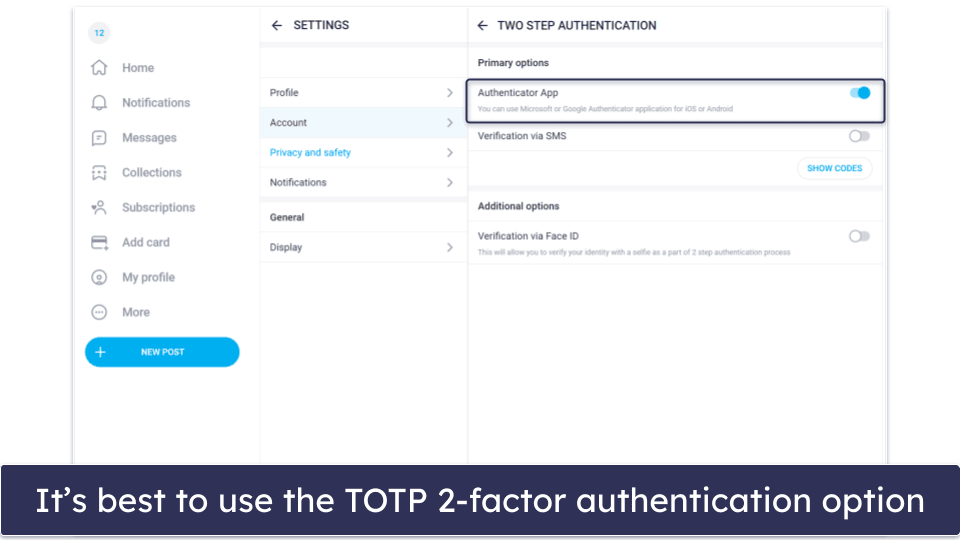
- Enable two-step authentication: it is the single highest-value setting on the account, free to turn on and effective against most takeover attempts.
Two-factor authentication is worth its own note. A second factor blocks most credential-stuffing attempts, and the same logic applies to a subscription account holding a saved card.
Warning: no support process on the platform asks for a password, a card number, or a verification code through a direct message. Any request that does is an attempt to take over the account.
FAQ
Why can’t I search for free OnlyFans pages directly?
There is no search surface that returns creators by price or category, so external channels do that work instead.
Are third-party ranking sites reliable for free pages?
A directory that records price, activity, and a last-updated date gives you enough to judge a listing.
What is the $0.10 hold at free signup for?
The platform uses it to confirm the payment method is valid before the account is activated, and it is refunded within days.
How do I avoid scam listings when searching for free pages?
Stay inside the platform’s own checkout, avoid shortened links, and never enter payment details on an unfamiliar domain. Check for recent activity before subscribing, and turn on two-step authentication so a leaked password alone cannot open the account.